

How To Create A Class In Swift
1- Your First Class
Swift is an inherited language from C and Objective-C, it is both a procedural language, both as a object oriented language. Class is a concept of the object-oriented programming language. Class have properties and methods, naturally, method is understood as a function of the class. From class you can create objects.
Swift using the class keyword to declare a class.
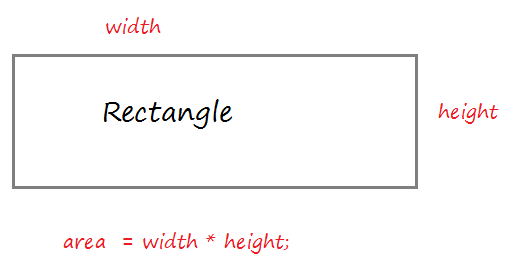
Create a resource file Rectangle.swift:
Rectangle.swift
import Foundation class Rectangle { // width property var width: Int = 5; // height property var height: Int = 10; // Default Constructor (No parameter) // (Used to create instance). init() { } // Contructor with 2 parameters. // (Used to create instance) // self.width refers to the width property of the class init (width: Int, height: Int) { self.width = width self.height = height } // A method calculates the area of the rectangle. func getArea() -> Int { var area = self.width * self.height return area } } The code using Rectangle class to create the object.
RectangleTest.swift
import Foundation func test_rectangle() { print("Create a Rectangle rec1"); // Create Rectangle object // via default constructor: init() var rec1 = Rectangle() // Print out width, height print("rec1.width = \(rec1.width)") print("rec1.height = \(rec1.height)") // Call the method to calculate the area. var area1 = rec1.getArea() print("area1 = \(area1)") print("---------") print("Create a Rectangle rec2"); // Create Rectangle object // via contructor with 2 parameters: init(Int,Int) var rec2 = Rectangle(width: 10, height: 15) // Print out width, height print("rec2.width = \(rec2.width)") print("rec2.height = \(rec2.height)") // Call the method to calculate the area. var area2 = rec2.getArea() print("area2 = \(area2)") } Edit main.swift to test this example.
main.swift
import Foundation test_rectangle() Running the example:
Create a Rectangle rec1 rec1.width = 5 rec1.height = 10 area1 = 50 ---------- Create a Rectangle rec2 rec2.width = 10 rec3.height = 15 area2 = 150 Now you should see the explanation of the Class, it's very important.
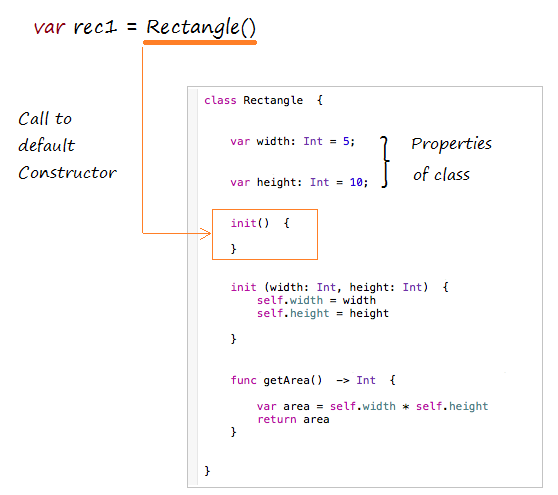
What happens when you create an object by default contructor?
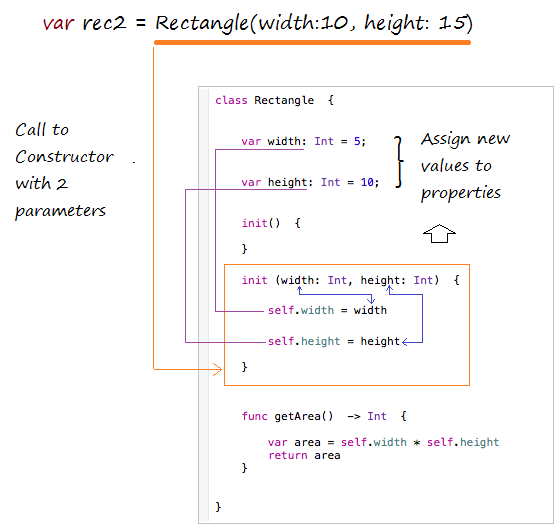
Create a Rectangle object by contructor with 2 parameters.
2- Rule to call Constructor
Rules for Swift 2.1 to call function, method, constructor:
- First parameter pass to methods and functions should not have required argument labels.
- Other parameters pass to methods and functions should have required argument labels.
- All parameters pass to Constructors should have required argument labels.
3- Object Comparison operators
In Swift, when you create an object through Constructor will be a real entity is created in memory, it has a specified address.
An operator assigned AA object by an BB object does not create new entity on the memory, it's just pointing to address of AA to BB's address.
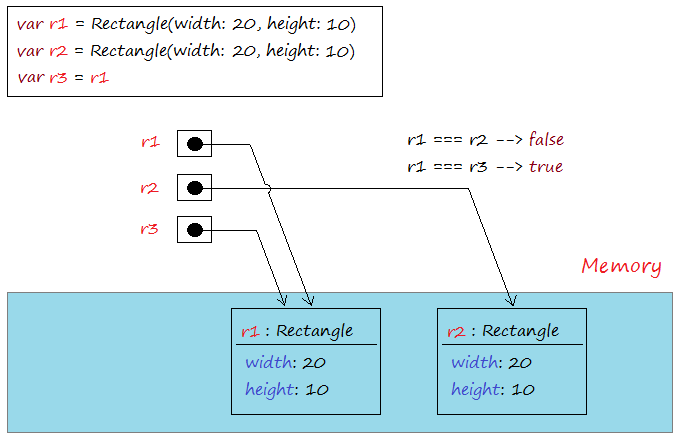
=== Operator used to compare two objects that is pointing to, it returns true if the two objects refer to the same address in memory. Operators !== is used to compare the two addresses of two objects that is pointing to, it returns true if the two objects that point to two different addresses.
IdentifyOperator.swift
import Foundation func identifyOperator() { // Create object: r1 var r1 = Rectangle(width: 20,height: 10) // Create object: r2 var r2 = Rectangle(width: 20,height: 10) var r3 = r1 var b12:Bool = r1 === r2 var b13:Bool = r1 === r3 print("r1 === r2 ? \(b12)") // false print("r1 === r3 ? \(b13)") // true var bb12: Bool = r1 !== r2 var bb13: Bool = r1 !== r3 print("r1 !== r2 ? \(b12)") // true print("r1 !== r3 ? \(b13)") // false } Running the example:
r1 === r2 ? false r1 === r3 ? true r1 !== r2 ? false r1 !== r3 ? true How To Create A Class In Swift
Source: https://o7planning.org/10579/swift-class-object
Posted by: deboermosedince42.blogspot.com
0 Response to "How To Create A Class In Swift"
Post a Comment